

Wednesday, February 20, 2013
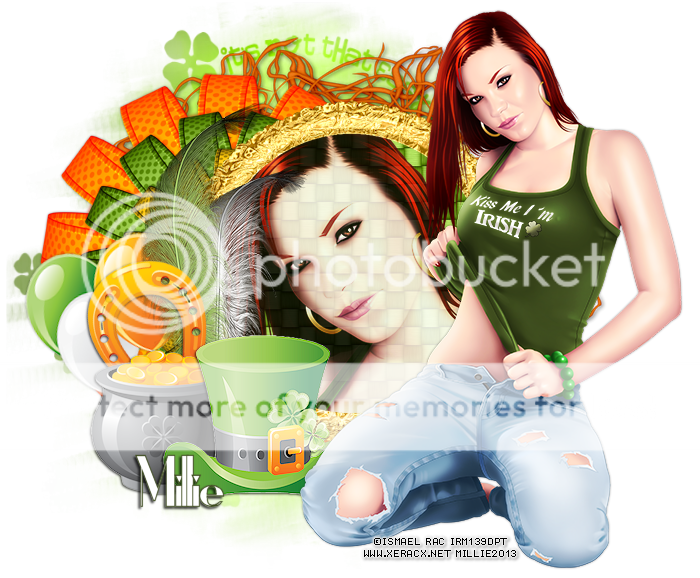
*click on image to view full size*
FTU Lovely Irish
This tutorial was written by me on February 20, 2013.
It was made out of my own creation and any similarity is purely coincidental.
I used pspx2 but any version should work without problems.
Let's get started!
Artist: Ismael Rac
Scrapkit: Get Me Irish On By Ella in Creative Misfits Blog
Mask: 56byCreativeSimone in Creative Misfits Blog
Plugins: xero - radiance
Font: Ironick-Normal
*open your mask and minimize it in your workspace*
File - New - 700x700 - Fill with white
Open frame 1 - resize by 50% - sharpen - c/p as new layer
Open netting 1 - resize by 75% - c/p as new layer - move under frame
Open bow2 - c/p as new layer - place to left
Open paper4 - c/p into selection - move under frame
Open tube close up - c/p as new layer - place face to fit inside frame
Click inside frame - expand by 5 - new layer
On tube layer - invert - delete - invert
On paper layer - invert - delete - deselect
On tube - xero - radiance - default settings - change opacity to 86
Open full tube - c/p as new layer - place to the right
Duplicate - xero - radiance - change opacity to 50
Open balloons - resize by 50% 2x - c/p as new layer - place to left
Open feather1 - resize by 50% - c/p as new layer - place to left
Open horse shoe - resize by 50% 2x - c/p as new layer - place to left
Open pot o gold - resize by 50% 2x - c/p as new layer - place to left
Open top hat - resize by 50% then by 75% - c/p as new layer - place to left
Go to background layer
Open paper 6 - c/p as new layer
Layers - new mask layer - from image
find your mask name in source window - mask from source luminance - hit ok
merge group - delete background - merge visible
Add your credits and your name
Tuesday, February 19, 2013

*click on image to view full size*
FTU Got A Bit Of Irish In Me
This tutorial was written by me on February 19, 2013.
It was made out of my own creation and any similarity is purely coincidental.
I used pspx2 but any version should work without problems.
Let's get started!
Artist: Ismael Rac
Scrapkit: Bit Of Irish by Manipulated by Magik
Mask: mask1pre by Chas
Plugins: porcelain
Font: OzzyII and Glider Girls
*open your mask and minimize it in your workspace*
File - New - 700x700 - Fill with white
Open frame 1 - resize by 85% - sharpen - c/p as new layer
Click inside frame layer w magic wand - expand by 5
Open paper 7 - c/p as new layer - invert - delete - deselect
Move paper under frame
Duplicate frame - change blend to overlay
On bottom frame add drop shadow of 2 -2 65 5 black
Open lucky glasses - resize by 50% - c/p as new layer - place to right
Open flower - c/p as new layer - place to left
Open vines - c/p as new layer - move down a bit
Open shamrock lolli - resize by 50% - c/p as new layer - place to right
rotate to the right some with deform tool
Open rose - resize by 50% - sharpen - c/p as new layer
Open tube - resize to fit your tag - c/p as new layer
Xero - porcelain - default - change blue channel to 0
Open sparkle 2 - c/p as new layer - place to your liking
Open film - resize by 75% - adjust - move down some
c/p your tube - move under frame - resize it by like 50%
place to the right - duplicate - mirror - merge down
Click inside film with your magic wand - expand by 2
On tube layer - invert - delete - invert
New layer - flood fill with gradient consisting of purple from frame and white
Move layer under tube layer
On tube layer change blend mode to luminance (L) - opacity to 45
Duplicate change blend mode to screen - opacity to 65
Add drop shadow to the film
Open hat - resize by 65% - c/p as new layer - place to left
Open mug of beer - resize by 60% - sharpen - c/p as new layer
Place to the bottom right
Open ribbon - c/p as new layer - place to bottom of tag
Open lace ribbon - resize by 85% - c/p as new layer - move to bottom of film
On background layer
Open glitter spatter - c/p as new layer - place to left
duplicate - mirror - flip - move down some
Open flower 3 - resize by 65% - c/p as new layer - place to left
Duplicate 3x and place them in a row to the left - merge them together
duplicate - mirror - move it around to your liking
Go to background layer - click inside it w magic wand - new layer
Open paper9 - c/p into selection - deselect
Layers - new mask layer - from image
Find your image in source window - mask made from source luminance - hit ok
Merge group - delete background - merge visible
Write "a bit of irish in me" with your text tool in yellow from tag
OzzyII font, 48pt, foreground null - convert to raster layer - add drop shadow
Change blend to screen and place over film - duplicate 2x - merge down
add credit and name

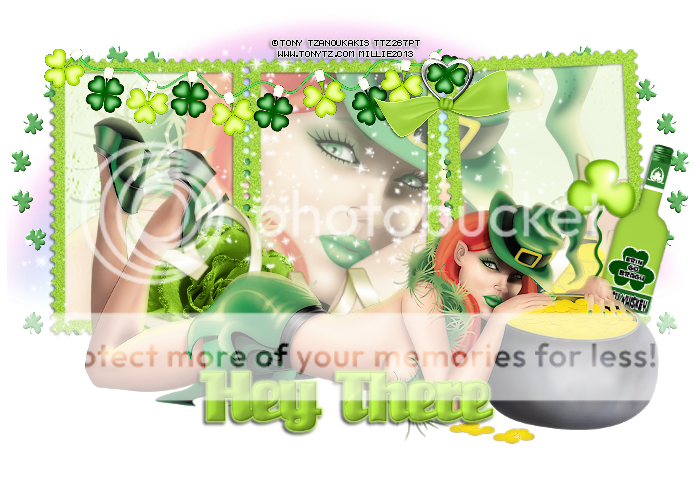
This tag was made with fabulous work of Tony Tzanoukakis.
This kit is called Lucky Me by Niqui's Designs and you can find it HERE
Here are some snags for you all.
I hope you like them and can use them :)
Click on image to save full-sized.




Subscribe to:
Posts
(Atom)